Photo jigsaw · two-player

Your photo becomes the puzzle.
Solve it with someone.

SharePuzz slices a photo from your phone into a jigsaw. Play on your own, or share an eight-character room code and bring one other person in - finish the same board together, or race to see who finishes first. No sign-up, no account, no ads.


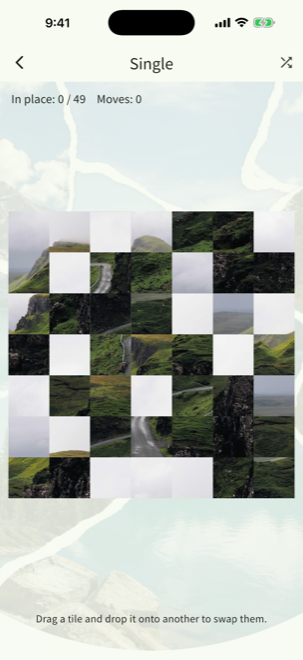
A photo of green hills and a winding mountain road split into a 7 by 7 grid of shuffled tiles.

Three modes, plus a minigame

Play solo, work together, or race. Whoever gets invited joins for free.

🧩

A) Single

A puzzle on one device. Pick a photo and split it into anything from 5×5 to 10×10, then drag and drop the tiles into place. Bigger screens make the higher grids worth it. Free, always.

🤝

B) Co-op

Two people, one board, synced in real time. Their moves land on your screen as they make them. Good for playing while you are on a call, or sitting next to each other. Creating a room needs a subscription.

⚡

C) Versus

Same photo, same starting layout, two separate boards - first to finish wins. Their progress shows on half of your screen as you go. Comes with a tic-tac-toe minigame. Creating a room needs a subscription.

🔑

D) Join - free for whoever is invited

The person who creates the room needs a subscription. The person who joins does not. They enter the room code or scan the QR and they are in, on the free plan. Join is its own button on the home screen, separate from creating, and the app works out whether the code belongs to a Co-op room, a Versus room or the minigame - nobody has to pick a mode.

Built around photos only the two of you recognise

📷 Play with your own photos

Only the two of you know what it is supposed to look like.

A trip you took together, a meal on a particular evening, the dog asleep in a patch of sun. The photo you pick from your album becomes the board - and because only the two of you have seen the finished picture, putting it back together turns into a conversation.
  • ✓Grid sizes: 5×5, 6×6, 7×7, 8×8 and 10×10
  • ✓Portrait and landscape photos both keep their proportions
  • ✓Photos are only relayed between the two devices - never written to disk, and cleared automatically
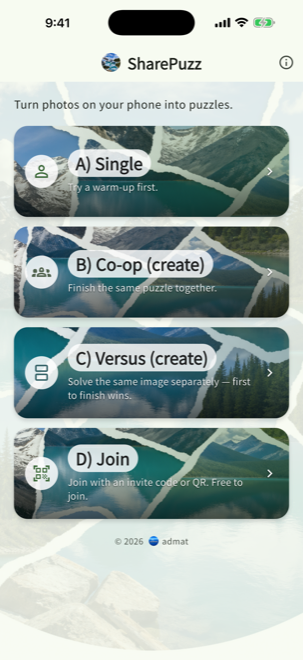
The SharePuzz home screen showing the four cards: Single, Co-op, Versus and Join.
Everything starts from four cards on the home screen.
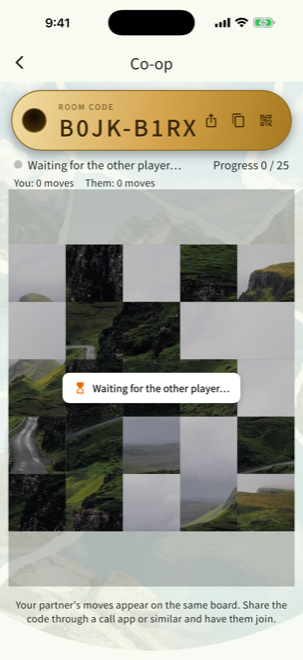
A Co-op room waiting for the other player, showing the room code, share buttons and the shared board.
Create a room, share the code, and the board is shared.
⚡ Together or head to head

One board between you, or one each.

In Co-op you are both moving tiles on the same board and you see each other work. In Versus you get identical boards and race - their progress sits on half of your screen, so you always know how close they are. Finishing order is judged by when the server receives the move, so a slow connection does not decide the winner.

  • ✓Identical starting layouts, so a race is genuinely fair
  • ✓The screen splits top/bottom or left/right depending on your orientation and the photo
  • ✓A tic-tac-toe minigame runs in the same room when you want a breather
🔑 Eight-character room codes

Read it out, scan it, or send it.

Room codes leave out the characters people mix up - 0 and O, 1 and I and L - and print as ABCD-WXYZ, so they survive being read aloud over a call. You can also push the code through your phone share sheet, copy it, or hold up the QR code if you are in the same room.
  • ✓Crockford Base32 - a character set made for reading aloud
  • ✓Share sheet, clipboard and QR, whichever suits the moment
  • ✓Drops reconnect on their own and pick up where you left off
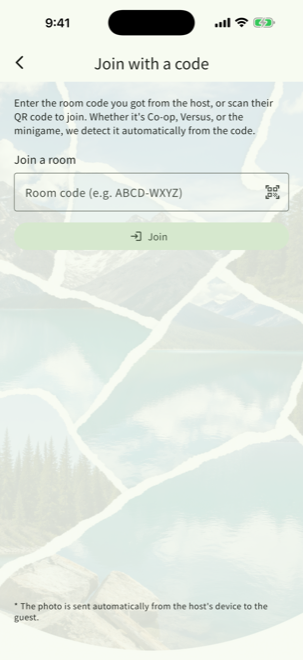
The Join screen with a room code field and a QR scanner button.
Joining takes a code or a QR scan - and it is free.

Who you might play with

✓A partner in another city, while you are on a call
✓Parents or grandparents who live far away
✓A child, during the quiet part of a video call
✓A friend, using a photo they will have to guess
✓Anyone you took the trip with, going back through it
✓Anyone who just wants a short, simple game

One simple subscription. No ads, ever.

Single play is free. The two-player modes come with a subscription - and only one of you needs it.

Feature
FreeNo cost
PremiumMonthly or yearly
A) Single
✓
✓
B) Co-op - create a room
×
✓
C) Versus - create a room
×
✓
Tic-tac-toe - create a room
×
✓
D) Join a room
✓
✓
Ads
None
None

Only the person creating the room needs a subscription - the person joining plays for free, so you can invite someone without asking them to pay. The yearly plan costs less per month than the monthly one. Current prices, any free trial and the billing terms are shown on the purchase screen in the app and on the App Store and Google Play listings; those displays prevail.

Questions people ask

No. There is no email sign-up and no social login. Install the app and single play works immediately. Co-op and Versus do not need an account either - sharing a room code is the whole process.
It is never stored permanently. A photo used in a Co-op or Versus room is held in the server's memory only, so it can be relayed to the other player, and it is discarded automatically once you have both left the room for a set time (24 hours by default) or 48 hours after the room was created. The Privacy Policy has the detail.
No - one of you is enough. Whoever creates the room needs it; whoever joins plays on the free plan. That way you can invite someone without putting them in the position of having to subscribe first.
Yes, Co-op and Versus work across the two platforms. The subscription itself does not cross over, though: it belongs to the store you bought it from. If you move between iPhone and Android, an existing subscription will not carry over and you will need to buy again on the new device - including any time left on a yearly plan. Cancel the old one yourself in the old store so you are not billed twice. Changing to another device on the same platform is fine - use Restore Purchases.
The app reconnects on its own, picks up whatever the other player did while you were away, and carries on. A tunnel or a lift is not a problem. While a banner at the top of the screen says it is connecting, that is the reconnection in progress.
A room holds two people - the host and one guest - and the server turns away a third. On top of that there are about 1.1 trillion possible codes (32^8) and join attempts are rate-limited per IP address, so guessing your way in is not realistic. Failed joins all report the same "room not found" message so that nobody can use the error to work out which codes exist.
Cancelling goes through the App Store or Google Play, following whatever each store requires. In the app you can jump straight to that screen: tap the info icon at the top right of the home screen, open About SharePuzz, then Manage or cancel subscription. Cancelling does not cut you off immediately - you keep the paid features until the period you have already paid for ends. After that the app moves to the free plan on its own and single play remains available.
There are no accounts to delete - the app never collects an email address or anything else that identifies you. Uninstalling removes the device identifier and all local data, which is the equivalent of account deletion elsewhere. One thing to note: uninstalling does not cancel a subscription, so cancel that in the store separately.

Next time you are on a call,
put a photo on the table.

Pick a photo only the two of you would recognise, share the code, and solve it together - or race. Single play is free, the two-player modes are a subscription, and there are no ads anywhere.